A statistical analysis plan (SAP) in Sapling is a Quarto Markdown file, sap.qmd. You do not need to remember its syntax: the editor shows the plan as a document that looks like its PDF, and you change it with text and forms.
Start from the protocol#
Run Sapling: New SAP from Protocol (USDM)... and pick the protocol as CDISC USDM JSON, or use a protocol document: from a terminal, sapling new mystudy --protocol protocol.pdf makes a study folder with a skeleton sap.qmd. The first plan has the sections of a SAP in the order of Gamble et al. (2017), and, taken from the protocol, the arms, visits, objectives, endpoints, estimands, populations and tests, each with its quote. Wherever the protocol leaves a choice, there is a yellow card: an open decision.
The bar at the top counts what is left: open decisions, warnings and errors. A first plan is never an approved plan; it says DRAFT until a person approves it.
The page#
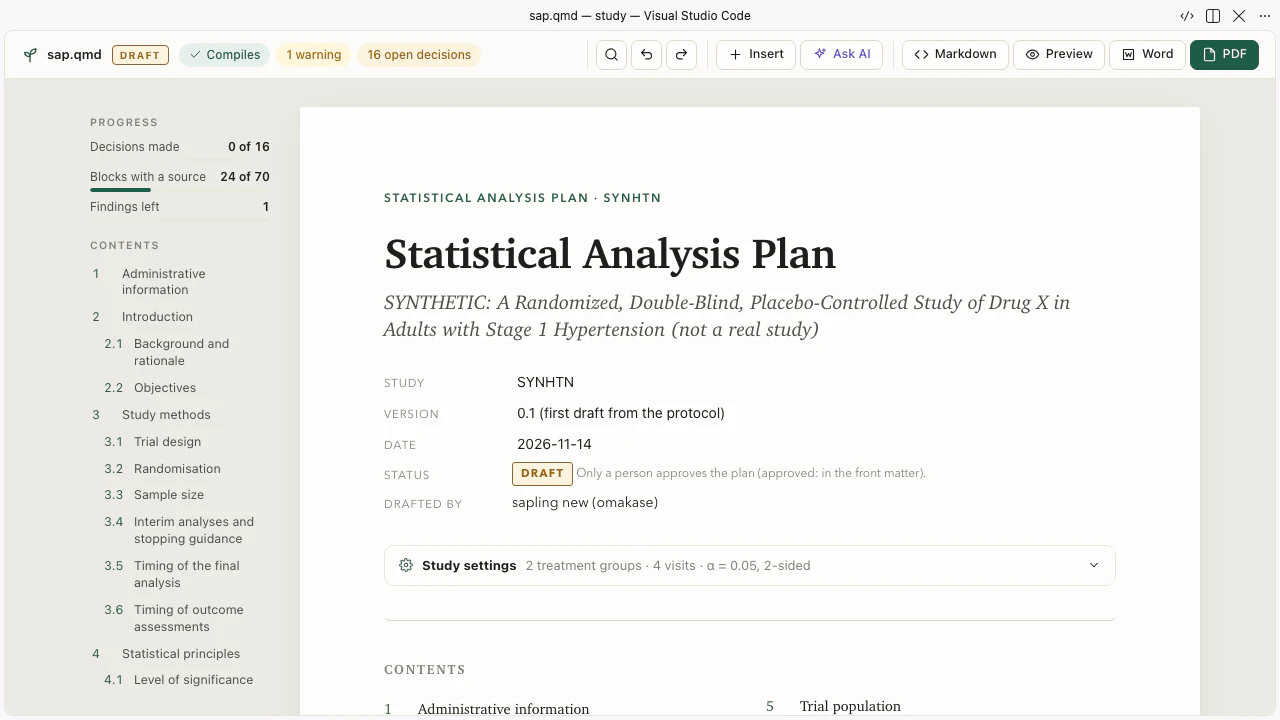
- Text in place. Type in a paragraph or a heading. A citation, a variable or a test in the text is a small chip; click it to change it.
- Blocks as forms. Click a block and it opens as a form: a population with a condition builder over the ADaM variables, an estimand with the five attributes of ICH E9(R1), a table with its columns and rows, an analysis with its model in an equation editor, a multiplicity procedure with its graph.
- Insert. The + between blocks, or / in the text, inserts a population, an estimand, a table, an open decision and more, each with ids not used yet.
- The Markdown beside it. The Markdown button shows the
.qmdnext to the page. A change on either side shows on the other at once. Every change in the page is the smallest text edit at the place of its block, so the rest of the file stays byte for byte andgit diffshows only what you changed.
Each choice quotes the protocol#
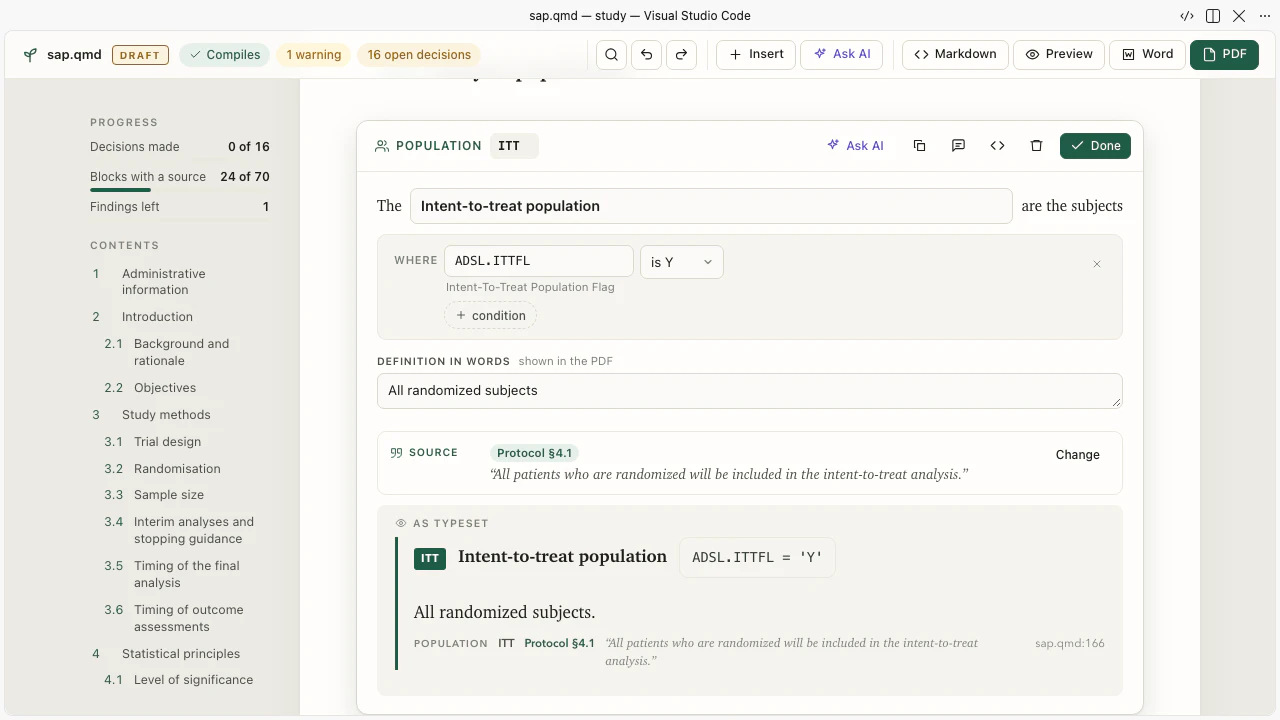
A block is a fenced div: its kind, an id, its attributes, its text. The protocol sentence it rests on is a citation right after it:
::: {.population #EFF condition="ADSL.EFFFL" definition="Patients with a baseline and at least one postrandomization measurement"}
Efficacy population
:::
[]{.cite source="protocol:4.1"}
You do not invent the quote. The compiler finds the words in the protocol and the editor lets you search the protocol's sentences and click one. A sentence that the protocol does not say is refused. Where the protocol is silent, you write an open decision and a person answers it later:
::: {.decision}
The protocol's investigator effect is the pooled site SITEGR1. Confirm that its pooling is this rule.
:::
What the SAP adds to the protocol is the statistician's own addition, written as a change block with what and why. See The plan language for every block.
The checks#
The compiler runs on every change, in about 20 milliseconds. A problem shows in the margin of its block and in the Problems view, with the position, a message and a fix: line that shows the Markdown to write. Many have a quick fix: a variable name you mistyped, a codelist value, a citation whose words are not in the protocol.
On top of the compiler there is the review: rules from the guidelines (ICH E9(R1), Gamble et al. 2017, FDA and EMA guidance, the method pages), each with the fix in Sapling and its source. It asks, for example, for a multiplicity block when there are several primary hypotheses, or for a missing-data block. You answer a finding with the block it asks for. To set a rule aside you write a waiver with your reason; the reason is shown in the PDF. The list of rules is on the review rules.
What a table will produce#
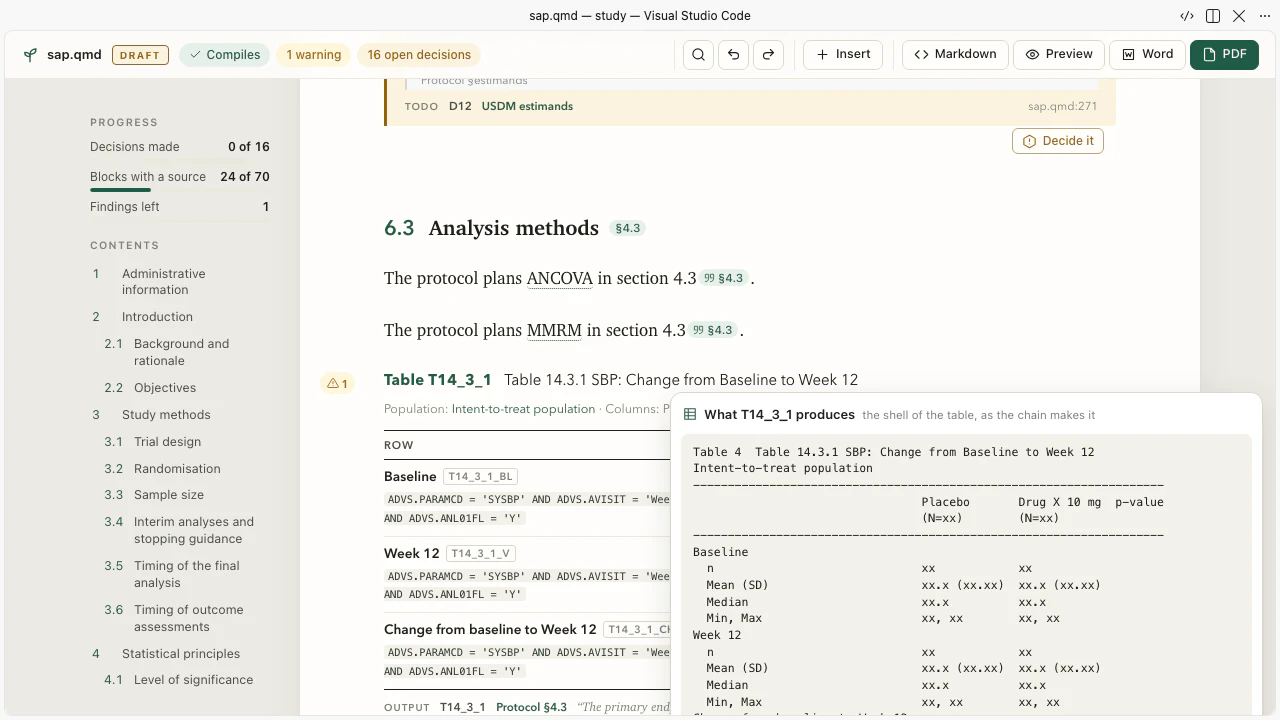
Hover a table in the page and click the table icon: the empty table as it will be produced, from the plan, before any data exist.
What only a person does#
Sapling never writes an approval, the answer of a decision or a waiver's reason for you. Decide it on an open decision records your answer, your name (the setting sapling.person) and today's date. Approving the plan is a person's edit of the front matter.
Next#
The decision interview goes through the open decisions one at a time. Word and PDF shows the plan to others.